Learning Path: Fine-Tuning Lab · Tutorial 02
Level: Beginner to Intermediate
Duration: 39 minutes, 47 seconds
Tools: Qwen · Unsloth · Modal · vLLM · Python · Hugging Face
Introduction
In our first Fine-Tuning Lab tutorial, we explored how to fine-tune a language model, evaluate it, and run it locally.
Now let’s take the next step: How do you deploy an open-weight AI model to the cloud and make it accessible to an application through an API?
That’s what we’re building in this tutorial.
We’ll start by loading Qwen locally with Unsloth, then deploy Qwen2.5-1.5B-Instruct on an NVIDIA T4 GPU using Modal and vLLM.
We’ll expose an authenticated inference API, connect to it from Python, test the access controls, measure response times, and inspect the actual compute costs.
And importantly, we’ll look at what happens when the GPU server needs to start before it can answer a request.
This is a practical introduction to AI model serving and cloud inference.
Watch the Full Tutorial

What You’ll Learn
By the end of this tutorial, you’ll understand how to:
-
Run an open-weight language model locally using Unsloth Desktop.
-
Understand the components of AI inference: model weights, inference engine, compute, and API.
-
Call your local model from Python through an OpenAI-compatible endpoint.
-
Set up Modal to run workloads on cloud infrastructure.
-
Deploy Qwen with vLLM on an NVIDIA T4 GPU.
-
Expose an authenticated cloud API that external applications can call.
-
Handle cold starts and server readiness, including startup retries and timeouts.
-
Measure request latency and token usage.
-
Test API authentication using valid, missing, and invalid credentials.
-
Inspect GPU costs and understand the trade-offs between performance and operating expenses.
What We’re Building
Our goal is to take an open-weight model and turn it into a working inference service.
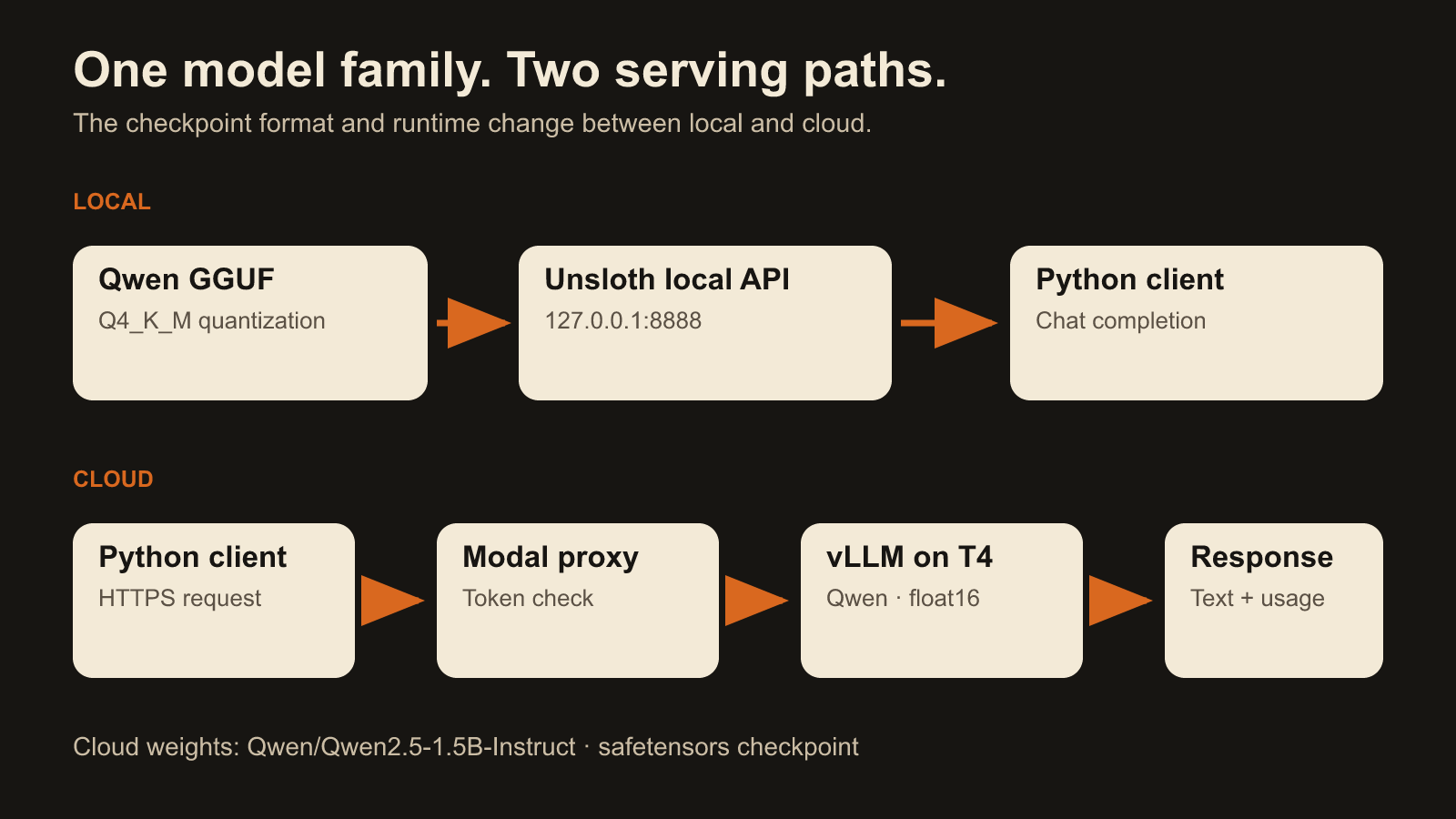
The cloud serving architecture looks like this:
Python Application → Authenticated Modal Endpoint → vLLM Inference Server → Qwen Model on NVIDIA T4 → Response
Each component has a different responsibility:
-
Qwen: Provides the language model.
-
vLLM: Loads and serves the model for inference.
-
Modal: Provides the cloud GPU, container environment, HTTPS endpoint, and deployment infrastructure.
-
Python: Acts as our application client, sending requests and processing the responses.
We first test the local inference path using a quantized GGUF model in Unsloth.
For the cloud deployment, we use the Hugging Face Qwen2.5-1.5B-Instruct checkpoint with float16 inference through vLLM. We are not uploading the local GGUF file to Modal, and this tutorial does not fine-tune a new model.
View the serving architecture diagram
What Happened During the Experiment?
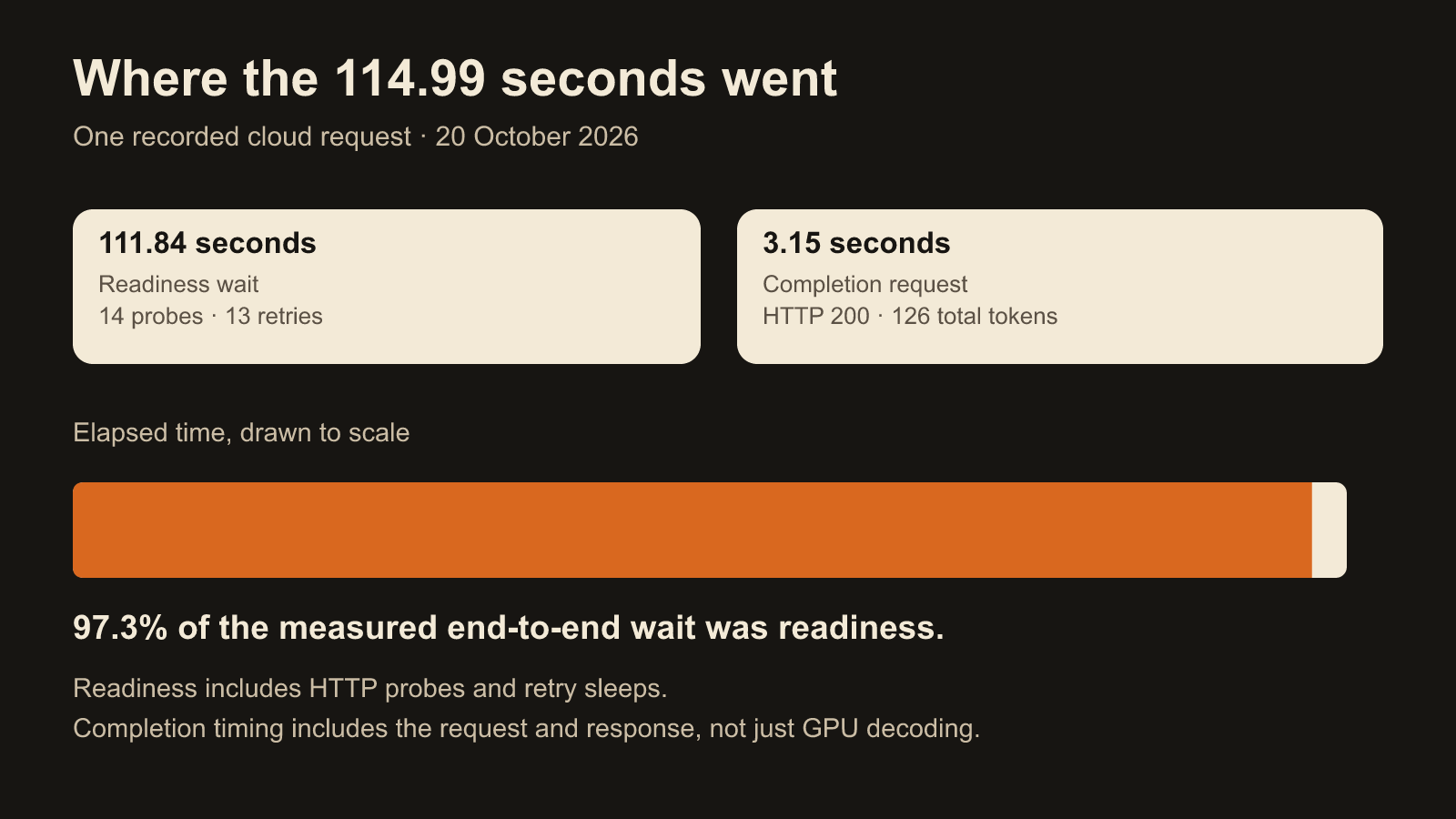
One of the most important lessons from this build was understanding the difference between model response time and the total time an application waits for a result.
Our cloud deployment used a server that could scale down when idle.
When we called the model, the server first had to become ready.
Here are the results captured during the tutorial:
| Measurement | Recorded result |
|---|---|
| Cloud GPU | NVIDIA T4 |
| Readiness wait | 111.84 seconds |
| Model request/response time | 3.15 seconds |
| Total elapsed time | 114.99 seconds |
| Readiness probes | 14 |
| Prompt tokens | 38 |
| Completion tokens | 88 |
| Total tokens | 126 |
The model returned a successful response, but most of the end-to-end time was spent waiting for the inference server to become ready.
This matters in production.
A model that generates a response quickly may still provide a slow user experience if the surrounding infrastructure is unavailable or has to start from zero.
For interactive applications, we have to think about cold starts, readiness, latency, and the cost of keeping compute available.
View the request timing diagram
Testing API Security
We also tested the authentication boundary.
The authenticated cloud request completed successfully.
Requests with missing credentials and deliberately invalid credentials were rejected with HTTP 401 responses.
That gives us evidence that the tested endpoint authentication worked as configured.
However, API authentication is not a complete production security architecture. Applications serving multiple users or organizations still need appropriate authorization, isolation, monitoring, and operational controls.
What Did It Cost?
I also wanted to understand what the cloud experiment actually cost.
The billing rows captured during the tutorial included GPU, CPU, memory, and network usage.
Total recorded cost: approximately $0.10.
This covered the displayed tutorial activity, including deployment-related startup and testing. It is not a fixed cost per request or a prediction of monthly operating expenses.
Actual costs will depend on GPU type, running time, startup behavior, traffic, and infrastructure configuration.
The key lesson is that deploying an AI model is not only about getting it to run. We also need to understand what it costs to keep the service available and useful.
Source Code & Learning Resources
Everything you need to inspect the implementation is linked below.
Project repository
The repository contains the deployment configuration, Python clients, readiness checks, authentication tests, and setup instructions.
Model and tools
Complete written walkthrough
Try It Yourself — Community Challenge
Now it’s your turn.
Using the repository and tutorial as a guide:
-
Load a small open-weight model locally.
-
Call it from a simple Python application.
-
Identify the model, inference engine, compute, and API components.
-
If you have access to suitable cloud compute, deploy a model to a remote inference endpoint.
-
Test its readiness and authentication.
-
Record the time required to start the server and generate a response.
-
Inspect the costs of the experiment.
Be careful with cloud costs. Cloud commands can activate billable resources. Set a spending limit, avoid leaving unnecessary services running, and stop your test deployment when finished.
You can complete the local portion without deploying to the cloud.
Questions & Community Discussion
I’m particularly interested in hearing how other builders think about the trade-offs involved in serving their own models.
If you were deploying an AI model for a real application, which of these would be your biggest priority?
-
Response speed and low latency
-
Keeping inference costs low
-
Control over your model and infrastructure
-
Model quality and reliability
And would you prefer to self-host an open-weight model or use a managed inference provider?
Share your thoughts below.
If you try the implementation, share your architecture, measurements, or any problems you encounter.
You can also post your complete project in Share Your Builds.
The goal is to move beyond models that work in a notebook and understand the systems that make them usable in real applications.
Build something useful. Show that it works. Help another builder do the same.
— Ugo Chukwu
IntelligenceOS · Domain Intelligence Builders